Building My Own AI Chief of Staff: From Too Many Apps to One Connected System
I've spent years experimenting with productivity tools, building my own software and trying to find a better way to manage work, life and everything in between. This is how I ended up building an AI Chief of Staff, and why the simplest approach might actually be the best.
The problem was never remembering to write things down
I've always been interested in productivity, technology and finding better ways to organise myself.
Between work, family, personal projects and everything else that comes with being an adult, there's usually a fair bit going on.
And like plenty of people, I've tried to solve that with technology.
Task managers, note-taking applications, project management tools, calendars, databases. You name it, I've probably looked at it.
Some were excellent at individual things. Others promised to become the one application that could manage everything.
But I kept running into the same problem.
I was spending too much time managing the system that was supposed to help me manage my life.
I'd capture tasks in one application, make notes in another, receive important information by email and then try to remember how everything fitted together.
Sometimes I'd remember a commitment but couldn't remember where I'd written it down.
Other times I'd have plenty of tasks recorded but no real sense of what deserved my attention first.
And occasionally, I'd spend an evening rebuilding my productivity system instead of actually doing the things sitting in it.
I eventually realised I wasn't looking for a better to-do list.
I was looking for something that could help me think, organise, remember and make decisions.
Essentially, I wanted my own Chief of Staff.
First, I tried building it myself
One of my more ambitious attempts was a project I called DalyHub.
Rather than continue moving between different applications, I decided to build something tailored to how I wanted to work.
The idea was to create a personal operating system where I could manage the important parts of my life.
It would bring together tasks, projects, goals, ongoing responsibilities, notes, decisions and things I was waiting on from other people.
I wanted to distinguish between projects that had an actual outcome and ongoing areas of responsibility that would never really be finished.
I also wanted a single place where I could capture information without having to immediately decide where it belonged.
Underneath it all was a fairly sensible idea: one reliable source of information, with AI helping me interpret and manage it.
I spent a considerable amount of time on the technical side.
DalyHub evolved into a progressive web application, with work on its interface, data structures, access controls and integration capabilities.
I experimented with connecting it to AI through tools that could read and update records, using defined permissions and approval requirements.
At one stage, I'd built a fairly substantial connection between DalyHub and the AI assistant, including tools to work with tasks, projects, decisions, notes and other records.
And technically, much of it was heading in the direction I wanted.
So why didn't I just keep using DalyHub?
Because I was starting to recognise another problem.
I was building and maintaining an entire software platform to solve a personal productivity problem.
Every new feature introduced something else to think about.
How should projects be structured? What should the task interface look like? How should information be captured? What happens when I want to change a workflow? How should AI permissions work?
There was always another improvement to make.
I enjoy building things, and DalyHub taught me a lot. It wasn't wasted effort.
But maintaining a custom application takes time, and I had to question whether I wanted to spend that time developing software or actually benefiting from the system I'd imagined.
It also helped me reach an important conclusion.
The intelligence didn't necessarily need to live in the same application as the information.
That changed how I approached everything.
The search for the right tools
Around the same time, I spent a fair bit of time exploring existing productivity and knowledge-management applications.
I looked at tools including Craft, Capacities, Heptabase and Amplenote.
They all approached organising information differently, which was part of what made the comparison interesting.
Craft: Great documents, but not the whole answer
Craft appealed to me because of its presentation and writing experience.
I liked the idea of keeping information in well-organised, readable documents rather than building complicated databases for everything.
But a nice document isn't necessarily the same thing as a useful personal operating system.
I still needed a way to manage actions, track commitments and connect information with what I needed to do.
Craft had its appeal, but it didn't settle the bigger question of how I wanted the entire system to work.
Heptabase: Thinking visually
Heptabase took a different approach, with an emphasis on visual knowledge management.
The ability to connect ideas spatially was interesting, particularly for learning, research and working through complex topics.
But I wasn't really trying to build a giant map of my thoughts.
I needed somewhere to reliably capture decisions, retrieve information and connect it to the practical things happening in my life.
Visual thinking has its place. It just wasn't the centre of what I needed.
Amplenote: Notes and tasks together
Amplenote was another interesting option because of its focus on connecting notes and tasks.
On paper, that addresses one of the frustrations I'd been trying to solve.
Information often creates actions, so why separate the two?
But the more I explored different approaches, the more I questioned whether combining everything into one application was actually necessary.
I'd been trying to find the perfect all-in-one solution for years.
Perhaps that was the wrong goal.
Capacities: A different way to organise knowledge
Capacities was one of the applications I kept coming back to.
What interested me most was its object-based approach to information.
Rather than thinking only in terms of folders and documents, I could structure information around things that actually exist in my life.
A project. An organisation. An incident. A shift. A person.
Each could have its own information and relationships to other records.
That made sense to me.
I particularly liked the potential for capturing information that wasn't necessarily a task but was still important to remember.
For example, a decision made during planning might not require immediate action, but it could influence something I do months later.
Capacities gave that information somewhere to live.
It didn't need to become my task manager or my email client.
It could simply be the place where I kept knowledge.
That was a much more useful way of thinking about it.
The breakthrough: Stop looking for one application to do everything
Eventually, I changed my approach.
Instead of searching for a single application that could manage everything, I started asking a different question.
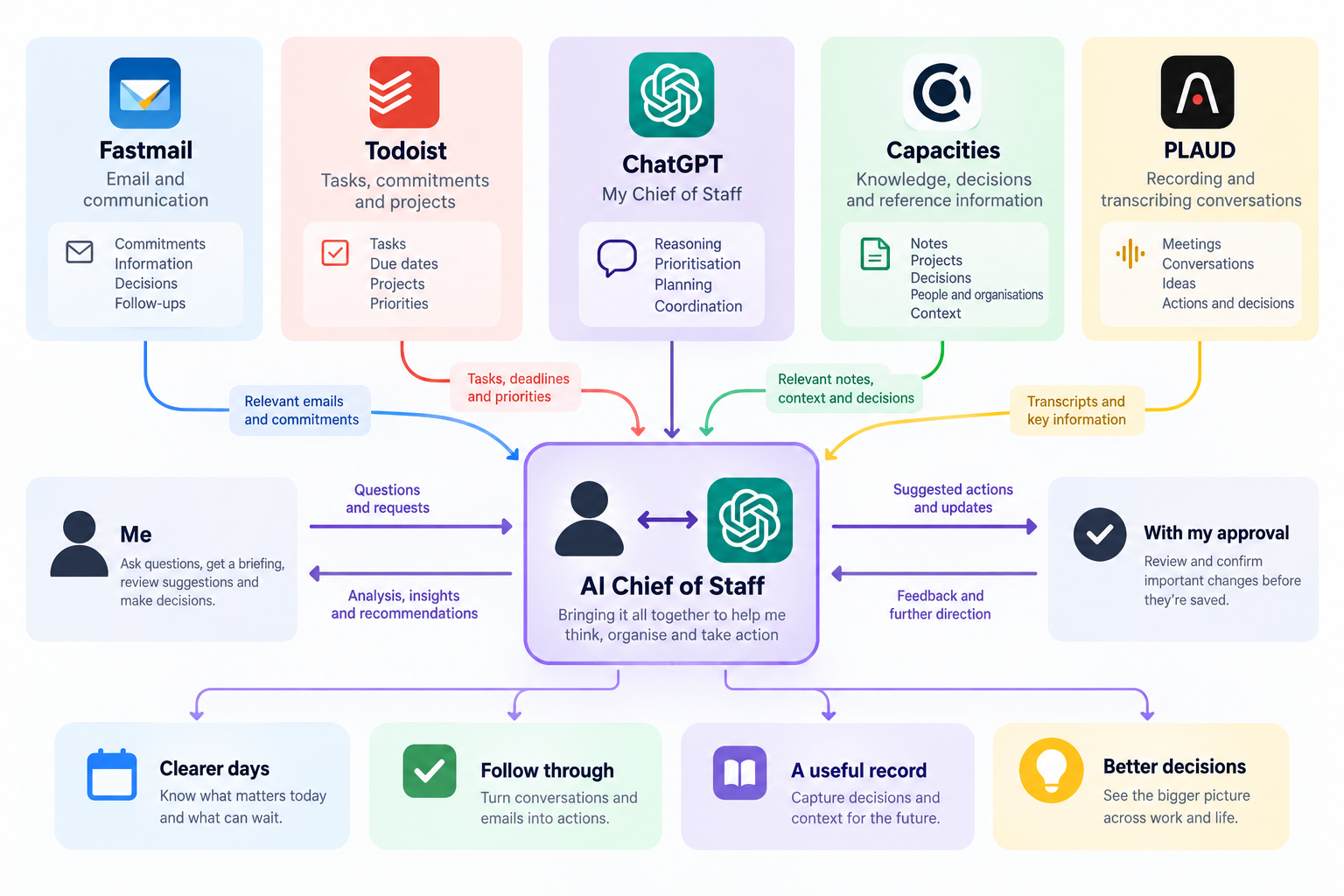
What if I used the best tool for each job and put an intelligence layer over the top?
I didn't need to build an email client. Fastmail already handled my email.
I didn't need to build another task manager. Todoist could do that.
I didn't need a custom knowledge database if Capacities could hold the information I wanted to remember.
And I didn't need to manually turn every conversation into notes if PLAUD could help capture and transcribe information.
What I was missing was something that could connect those tools and help interpret the information they contained.
That's where ChatGPT came in.
Rather than being another application in the collection, it could become the interface I used to work across them.
And that's how my current AI Chief of Staff started taking shape.
My current setup
Today, my setup revolves around five main applications.
Each has a fairly clear responsibility.
The aim isn't to copy information between applications unnecessarily.
It's to use the information where it already lives and bring the relevant parts together when I need to make a decision.
That might sound like a small distinction, but it's made a significant difference to how I think about productivity.
ChatGPT is the intelligence, not the database
The most important part of my setup is probably the role I've given ChatGPT.
I don't want it to become another dumping ground for information.
I want it to help me understand what's already there.
That means reviewing my tasks, considering my commitments, drawing on relevant notes and identifying things that might have slipped through the cracks.
It also means challenging me.
If I have an unrealistic number of priorities for the day, I want it to say so.
If a new idea doesn't really deserve its own project, I want it to tell me.
If I'm repeatedly putting something off, I'd like to understand why.
I'm not looking for an assistant that simply agrees with every idea I have.
I'm looking for one that helps me make better decisions.
How I actually use it
The real test of any productivity system isn't how impressive it looks.
It's whether you use it.
I've started building some fairly practical workflows around the Chief of Staff.
1. The morning briefing
One of my favourite uses is a morning briefing.
Instead of opening multiple applications and trying to piece together the day, I can ask my Chief of Staff to review what's going on.
The briefing is designed to consider my calendar, tasks, relevant emails, recent notes and outstanding commitments, using whatever connected information is available.
I want to know what matters today, what needs my attention, what I'm at risk of forgetting and what I should actually focus on.
I've also included local weather and fire danger information when relevant.
The important part is prioritisation.
I don't need an AI system to read twenty tasks back to me. Todoist can already show me those.
I want it to identify the three or four things most deserving of my attention and explain why.
Sometimes that means identifying something urgent.
Other times it might mean pointing out an important task I've been putting off while keeping myself busy with smaller things.
That's much closer to what I imagined a Chief of Staff doing.
2. Turning conversations into actions
I've also been exploring how to connect PLAUD recordings with the rest of the system.
Conversations are an interesting source of information because they often contain actions and decisions that never get formally recorded.
Someone agrees to follow something up. A decision is made. A new idea emerges.
Then everyone moves on.
With an appropriate recording and transcript, I can ask the Chief of Staff to review what was discussed and identify anything worth capturing.
An action might belong in Todoist.
A decision or piece of useful context might belong in Capacities.
And plenty of conversation content doesn't need to go anywhere at all.
I want the system to recognise the difference.
3. Making email more useful
I've used Fastmail for email management, including spending time cleaning up unnecessary messages and refining how different types of email are handled.
But reducing inbox clutter is only part of the problem.
The more interesting opportunity is identifying commitments hiding in emails.
If I've agreed to do something, it should have a clear place in my task management system.
If an email contains reference information worth retaining, I might want that reflected in Capacities.
And if it's just routine communication, perhaps nothing more needs to happen.
My goal is to stop treating my inbox as a second, poorly organised task manager.
4. Keeping my knowledge base useful
I'm particularly interested in the relationship between ChatGPT and Capacities.
Over time, my knowledge base should become a useful record of projects, decisions and things I've learned.
But I don't want AI automatically saving everything it encounters.
That would quickly create an enormous collection of information with very little value.
So I've been developing a review process.
The Chief of Staff can identify potentially useful information from recent activity and propose additions or updates.
I can then review those suggestions before significant changes are made.
For approved records, it can help identify outstanding actions and check Todoist to avoid creating duplicates.
It's still an evolving workflow, but the principle is important.
I want a knowledge base that's useful because the information has been selected, not simply because everything has been saved.
A practical example: Planning our wedding
One of the advantages of building this for myself is that I can test it against real things happening in my life.
Our wedding planning is a good example.
There's accommodation to organise, guests to communicate with, catering decisions, transport arrangements, bookings and a budget to manage.
Some information arrives by email. Some comes from conversations. Other details are already recorded in notes or tasks.
Rather than creating a new wedding planning application, I'm using the tools I already have.
Capacities can hold the broader planning context and decisions.
Todoist can track the things that actually need to be done.
Fastmail holds the correspondence.
And ChatGPT can help pull the relevant information together, review outstanding commitments and identify missing follow-ups.
For example, I've used this approach to review accommodation and transport arrangements and work out what still needs action.
Nothing particularly revolutionary about that.
But it's exactly the sort of everyday coordination I wanted the system to handle.
What about privacy?
There's an obvious question that comes with connecting all these applications.
How much personal information am I comfortable allowing an AI system to access?
It's a legitimate concern, and one I don't think should be brushed aside simply because the technology is convenient.
My setup involves cloud-based applications, each with its own privacy policy, security controls and data-processing arrangements.
Connecting them through AI adds another layer.
Information that originally lived in one service may be processed by another, depending on the connection and the request.
It's important to understand that these aren't necessarily private, locally hosted systems.
And a promise from one provider that it won't train AI models on customer information doesn't automatically tell me how every connected service handles that same information.
Drawing boundaries
I've been working towards a few principles.
First, not everything needs to be available to the Chief of Staff.
There's a difference between organising my personal life and handling information that's confidential or operationally sensitive.
Given my professional responsibilities, that's a distinction I need to take seriously.
An application being technically capable of processing something doesn't mean it's appropriate or authorised to do so.
Second, I want important changes to remain under my control.
I've been deliberately building approval steps into workflows involving significant additions to my knowledge base.
And I want to know what actions an application is permitted to perform on my behalf.
Third, recorded conversations require particular care.
PLAUD can be useful, but conversations often contain information belonging to other people. Recording and AI processing need to be considered appropriately, including consent, confidentiality and whether the material should be recorded at all.
I'm still learning
I'm not going to claim I've completed a comprehensive privacy or security audit of this setup.
I haven't.
I'm still reviewing what information I'm comfortable connecting, how permissions should work and what should remain outside the system entirely.
I also recognise that convenience and privacy can sometimes pull in different directions.
The more context an AI assistant has, the more useful it can become.
But more access also means more information potentially exposed if something goes wrong.
For now, I'm trying to take a deliberate approach rather than automatically connecting everything just because I can.
Privacy isn't something I've solved. It's an ongoing part of how I'm developing the system.
What I've learned from all the experimenting
Looking back, the biggest change hasn't really been technological.
It's been how I think about productivity.
For a long time, I was searching for the perfect application.
I wanted one place where I could manage tasks, notes, projects, goals, communications and everything else.
When I couldn't find it, I tried building it.
And while I enjoyed the process, I eventually realised that combining everything into one application wasn't necessarily going to solve the underlying problem.
A perfectly organised database doesn't automatically tell you what matters today.
A beautifully designed notes application doesn't ensure you follow through on commitments.
And a task manager with hundreds of carefully categorised tasks doesn't necessarily help you make better decisions about your time.
The real value comes from interpreting the information and turning it into something useful.
That's the part AI is starting to help with.
Simplicity is harder than it looks
One slightly uncomfortable lesson from this whole process is how easy it is to overcomplicate productivity.
I've spent countless hours experimenting with systems designed to save time.
There's a certain irony in that.
But I don't regret the experimentation.
Building DalyHub helped me understand what I actually wanted from a system.
Trying different note-taking applications helped me appreciate the difference between storing information and managing actions.
And connecting existing tools through ChatGPT has made me question whether I need to build as much as I originally thought.
These days, I'm less interested in having the most sophisticated productivity setup.
I'm more interested in one that works reliably and doesn't demand constant attention.
Is it actually an AI Chief of Staff?
That's probably a fair question.
It's not an autonomous assistant that independently runs my life.
And I wouldn't want it to be.
It can't always see every piece of information I need. Connected services have limitations, and sometimes information needs to be checked manually.
It can misunderstand context, miss something important or suggest an action that doesn't make sense.
It still requires judgement and oversight.
But I don't think that makes the concept any less useful.
A good Chief of Staff isn't simply someone who completes tasks.
They're someone who helps bring order to competing priorities, maintains awareness of commitments, identifies problems and supports better decisions.
That's the role I'm trying to give AI in my own life.
Not replacing my judgement, but giving me better information to exercise it.
Where I want to take it next
There's still plenty I'd like to improve.
I'd like my Chief of Staff to become better at understanding the relationship between my time, commitments and longer-term goals.
For example, it would be useful to recognise when I'm consistently overcommitting myself.
Or when a project is repeatedly being delayed because more immediate work keeps getting in the way.
I'd like it to help me review the week, not just the day.
What did I actually achieve? What slipped? What needs to change next week?
I'd also like to continue refining how it captures knowledge from conversations, emails and other sources without creating unnecessary noise.
And I want to keep the system maintainable.
That means resisting the temptation to add complexity simply because something is technically possible.
The goal hasn't changed
When I started building DalyHub, I wanted a better way to manage everything going on in my life.
That goal hasn't changed.
What's changed is how I think I can achieve it.
Instead of trying to create one enormous application, I'm now using several established tools that each do their own job, with ChatGPT helping me connect the information and make sense of it.
It's still evolving, and I'm sure I'll continue changing things as I learn what works and what doesn't.
But for the first time, I'm spending less effort trying to build the perfect system and more time using the one I've got.
And that's probably the biggest improvement of all.
The best productivity system isn't the one that can do everything. It's the one that helps you focus on what actually matters, without becoming another job in itself.